Unlocking AI Power: How VRAM AI Makes Your Models Super Efficient
Ever wondered how big AI models — the ones that write stories or generate images — actually work behind the scenes? Picture a busy kitchen full of chefs (the AI models), each waiting to cook up a dish (generate a response). The catch: every chef needs a lot of space and expensive equipment (GPU memory) to work. VRAM AI is the super-smart kitchen manager that keeps the whole operation running smoothly — and cheaply.
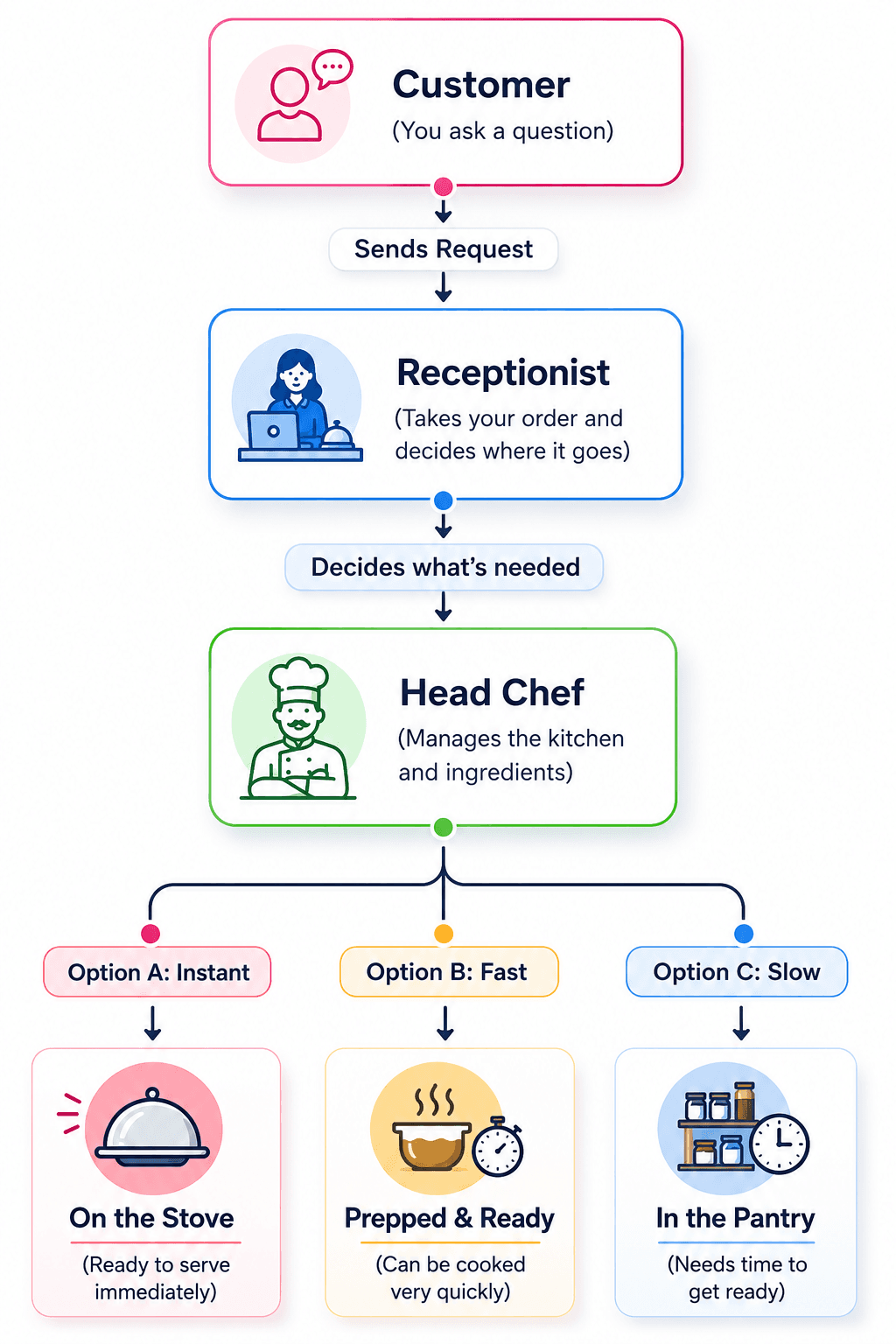
The front desk: the Inference Gateway
When you ask an AI a question, your request first hits the Inference Gateway — the kitchen’s front desk. It’s the single point of contact for every incoming order. Its job is to understand what dish you want, decide which chef is best suited to prepare it, and manage the flow of orders so the kitchen never gets overwhelmed.
The genius manager: the Swap Orchestrator
Once the gateway knows what’s needed, it hands the request to the Swap Orchestrator — the real brains of the kitchen. This is where all the clever, proprietary decisions happen. The orchestrator constantly weighs three calls:
- Promotion: Which chef (model) should be brought to the front for immediate cooking.
- Eviction: Which idle chef should step aside to make room for a more urgent order.
- Predictive scheduling: Anticipating which dishes get ordered next and prepping the right chefs in advance.
This matters because large models eat a lot of expensive GPU memory. VRAM AI’s core innovation is to dynamically swap models in and out of that memory, so only the models you actually need are burning premium resources at any moment.
The three states of a model
After the orchestrator decides, your request is routed to a model in one of three states — each a different trade-off between speed and cost:
Why this matters for you
You don’t need to know any of the plumbing to feel the benefits. This system means AI apps can:
- Run more models: Offer a wider variety of AI services without buying an endless rack of GPUs.
- Stay responsive: Frequently used models are always hot, so answers come back fast.
- Cost less: Smart memory management cuts the bill — which means more affordable, more powerful AI.
In short, VRAM AI makes AI more accessible and efficient by intelligently managing the valuable resources that power these models. It’s a perfectly organized kitchen where every chef is used to their fullest — so you always get your AI-powered dish, fast.
See it on your own workload
Find out how many GPUs you actually need — and what VRAM AI could save you each month.